

Tag List
Qubes 10.0 TagList component.

Properties
| Property | Description |
| ColumnCount | Number of columns to display. 0 displays the tags in rows. |
| TagStyles | List of tags' style when not selected. Empty means that no color will be affected by default. |
| Enabled | Boolean indicating whether or not the component is enabled. |
| Hint | Specifies the user hint string that will appear in the component's interactive help bubble. |
| Items | List of values associated to labels. |
| Labels | List of tag labels. |
| Multiple | Boolean that indicates if there is the possibility to select multiple tags. |
| SelectedTagStyles | List of tags' style when selected. Empty means that the selected color will be blue with white font color by default. |
| TagMaxWidthRatio | Maximum width in % to display the tag. By default, auto uses column's width. |
| ValueInitial | Determines the component's initial value when the screen opens and each time it is reset (see Reset Button). |
| Visible | Boolean indicating whether or not the component will be visible. |
Value
If Multiple's value is true, the component's value is a list of the selected elements' values. Else, it is the value associated with the selected tag.
Remarks
Syntax of TagStyles: tagColor[;shadowColor][;borderRadius].
tagColor and shadowColor are colors in HTML format and borderRadius is a positive integer.
Default value is "rgba(255,255,255,0);rgba(0,0,0,0);16".
Updated syntax in Qubes 11.0: tagColor[;shadowColor][;borderRadius][;borderWidth][;borderColor]
borderWidth, borderColor and fontWeight accept the values of corresponding CSS properties : border-width,border-color and font-weight.
Syntax of SelectedTagStyles: tagColor[;shadowColor][;borderRadius][;fontColor][;showIcon].
tagColor, shadowColor and fontColor are colors in HTML format and borderRadius is a positive integer.
Default value is "#448AFF;rgba(0,0,0,0);16;rgba(255,255,255,1)".
Updated syntax in Qubes 11.0: tagColor[;shadowColor][;borderRadius][;fontColor][;showIcon][;borderWidth][;borderColor][;fontWeight]
borderWidth, borderColor and fontWeight accept the values of corresponding CSS properties : border-width,border-color and font-weight.
(Qubes 11.0) Syntax of TagStyles and SelectedTagStyles now accept empty values between the ";". Empty values will be interpreted to the corresponding default value.
Example to set grey borders on unselected elements :
TagStyles= =List(";;;2px;grey")
For TagStyles and SelectedTagStyles, if the length of the list is equal to 1 then the color is applied to each tag.
With ColumnCount's value > 0, each tag cell uses the maximum width allowed. If its value is equal to 1, carriage return inside a tag is allowed.
It is expected that Items and Labels have the same number of entries, if they do not, the number of visible entries is the max of Items and Labels, for each entry:
- if a label exists it will be used for display, otherwise the item is used
- if an item exists it will be used for the value, otherwise the label is used
Examples

The following settings were defined to generate the above tag:
Cell's height is set to 110 and the width is set to 460.
- To indicate tags' colors:
TagStyles=List("#eae4e9", "#fff1e6", "#fde2e4", "#fad2e1", "#e2ece9", "#bee1e6", "#f0efeb", "#dfe7fd", "#cddafd")
- To set the tags' selected color to red:
SelectedTagStyles=List("#ff0066");
- To specify the labels of the tags:
Labels=List("Lorem", "ipsum", "dolor", "sit", "amet", "consectetur adipiscing elit", "sed do eiusmod", "tempor", "incididunt",
            "ut labore et dolore magna aliqua", " Ut enim ad minim veniam")
- The value of the tags is by default
Items=
- To display the tags in rows:
ColumnCount=0
- Tags use the maximum width allocated:
TagMaxWidthRatio=auto
- You can select multiple tags:
Multiple=true
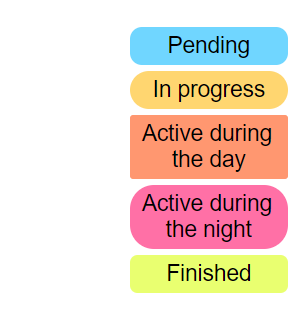
The following settings were defined to generate the above tag:
Cell's height is set to 220 and the width is set to 200. The cell is justified to the right and auto carriage return is enabled.
- To indicate tags' style:
TagStyles=List("#70d6ff;rgba(0,0,0,0.5);8", "#ffd670", "#ff9770;rgba(0,0,0,0.5);2", "#ff70a6", "#e9ff70;rgba(0,0,0,0.5);5")
- Labels of the tags are their values:
Labels=
- The default selected style is used:
SelectedTagStyles=''
- To specify the items:
Items==List("Pending", "In progress", "Active during the day", "Active during the night", "Finished")
- To display the tags in a single column:
ColumnCount=1
- Tags use only 50% of space:
TagMaxWidthRatio=50
- You can select only one tag:
Multiple=false