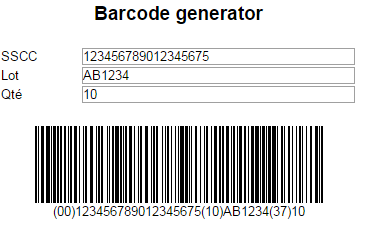
Barcode
Qubes 6.6 Barcode display component.
Properties
| Property | Description |
| Data | String to encode. |
| Enabled | Boolean indicating whether or not the component is enabled. |
| Hint | Specifies the user hint string that will appear in the component's interactive help bubble. |
| Scale | Size (in pixels) of the smallest module in the symbology. |
| Symbology | Symbology of the barcode (Code128 by default). |
| ValueInitial | Determines the component's initial value when the screen opens and each time it is reset (see Reset Button). |
| Visible | Boolean indicating whether or not the component will be visible. |
Value
N/A
Supported symbologies
- Code128: for code 128 and GS1-128 (formerly EAN-128), the special character used for "Function 1" being "¤"
Remarks
Displays Data in a barcode using the Symbology.
The color of the barcode is the same as the color of the cell's text. Dynamic changes to that color are not supported (keeps the color defined during design).
The barcode's background is the same color as the cell's background. Dynamic changes to that color are supported (via conditional formatting).
The graphic display does not include any text. If needed, you can place any text in another XForms cell.
There is no "quiet zone" (blank space around the barcode to prevent the rest of the displayed content from interfering with the scanner) for the component. If needed, space can be reserved in the adjacent cells, or the cell's width can be expanded (see below).
Vertically, the barcode will automatically extend to the full height of the cell.
Horizontally, it only uses the necessary space (depending on the encoded data and the Scale parameter):
- if the barcode is too big to fit into the cell, it will be compressed proportionally, but will no longer match the Scale parameter (which could negatively affects its scanability);
- if the necessary space is narrower than the cell's width, the horizontal alignment inside the cell will be the same as the text alignment.
We recommend providing a sufficient cell width to display the widest of the possible barcodes in the application, with a quiet zone, and to define a centered alignment.
Enabled property is not supported.
Examples
To display a GS1 barcode containing SSCC 123456789012345675 and batch number AB1234 and with the number of units set to 10:
Data = '¤00'+SSCCNo+'10'+BatchNo+'¤37'+Nb