

Layer Layout
Default Positioning
By default, layers are positioned in relation to the upper left corner of the screen. The PositionReference property allows you to define an alternative reference point for the PositionLeft and PositionTop properties.
Browser Rendering Considerations
Different web browsers may render layers with slight variations, potentially causing a few pixels of offset per row or column. When layers are all positioned relative to the upper-left corner, this can result in awkward element overlap. To mitigate this issue, position layers relative to one another.
PositionReference
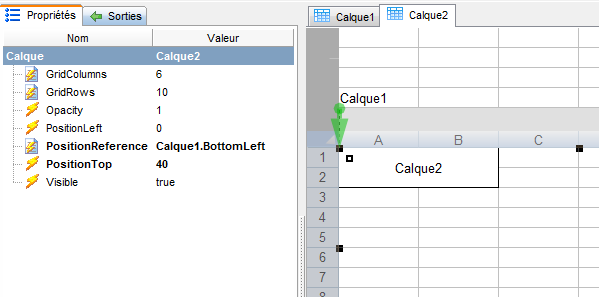
Example: Layer2 positioned below Layer1
The usual method for defining PositionReference is to use the mouse to drag the layer by its top left anchor to the desired reference point. If your mouse is hovering over an invalid point (like a circular reference), a red X will appear.
For example, if one layer needs to be below and left-aligned with another, attach it to the bottom left corner of the parent layer.
In the example shown here, Layer2 is positioned in relation to the lower left corner (BottomLeft) of Layer1, with a horizontal offset (PositionLeft) of 0 and a vertical offset (PositionTop) of 40.
Once the layers have been connected, an arrow will indicate the relationship, going from the reference point toward the positioned layer.
To delete or redefine a reference, you can interactively pick up the anchor and release it at the desired location (or "nowhere" if you want to delete the reference), or you can manually edit the PositionReference property.
Remarks
PositionReference can only be defined during design. If a formula is used, it will be evaluated during design, not dynamically when the screen executes.
Syntax
The syntax of PositionReference is:
[LayerName][.Reference][.Match]
The .Reference is a concatenation of a vertical and horizontal qualifiers:
- Vertical: Top | Middle | Bottom
- Horizontal: Left | Center | Right
Exemples:
- .TopLeft : the upper left corner
- .BottomRight : the lower right corner
- .MiddleCenter : centered vertically and horizontally.
Note: Middle and Center qualifiers are supported from Qubes 11.0 onwards.
The .Match option is only supported in Qubes 9.0, it can take the following values
- .MatchColumns: the layer columns width will automatically be updated to match the width of columns in the reference layer. Extra column in the layer or reference are ignored.